


How to use GTR's web site
This page describes how to use the GTR to find tests and other genetic information. The content of this site is designed to assist health care providers and researchers navigating the landscape of genetic tests. Patients and consumers with specific questions about a genetic test should contact a health care provider or a genetics professional.
NIH does not independently verify information submitted to the GTR; it relies on submitters to provide information that is accurate and not misleading. NIH makes no endorsements of tests or laboratories listed in the GTR. GTR is not a substitute for medical advice.
This page is focussed on how to find information, not how to submit it. Go here for information about how to submit a description of your tests to GTR.
- Getting Started
- Resources for how to use GTR's web site
- Information about GTR's data sources
Getting Started
Find tests for a condition or drug response
- Query for a test by clicking on the Tests tab on the home page or by selecting 'Tests' from the pull-down menu to the left of the Search button on any other page,
- Start typing the name of the condition or drug.
- If you see the name of the disorder in which you are interested appear under the query bar, click on it, otherwise click on Search
- If you used Search, the result page will probably list multiple disorders in the left column. Click on the one you want
- If there are multiple tests listed for the condition in which you are interested, you can focus on those of most interest to you by selecting from filter options in the left column, such as method used in the test, certifications of the offerer, and location of the laboratory.
Find tests using words in the test name
- Query for tests with one or more words in the test name within the Tests tab.
- Use double quotation marks around the word(s) and an asterisk after the last word, e.g. "mitochondrial*"[testname]" or "respiratory chain*"[testname]. Click Search.
Find genomic tests
Submitters describe 'test targets' which are assayed in their tests, such as chromosomes, genes, proteins and analytes. Users can find tests that assay:
- Human genome (also called Whole genome, Complete genome, etc.)
- Whole exome
- Mitochondrion (also called Mitochondrial genome, Mitochondrial DNA, etc.)
To find tests with combinations of these targets, click on the links below:
- Human genome OR Whole exome
- Human genome AND Whole exome
- Human genome AND Whole exome AND Mitochondrion
- Human genome OR Whole exome OR Mitochondrion
To construct your own searches using 'AND' / 'OR' (which must be capitalized), enter combinations of these indexed terms into the GTR search box:
Human genome[TESTTARGET]
Whole exome[TESTTARGET]
Mitochondrion[TESTTARGET]
**EXAMPLE**: Human genome[TESTTARGET] AND Mitochondrion[TESTTARGET]
Find a laboratory
- Query for a laboratory by clicking on the Labs tab on the home page or by selecting 'Labs' from the pull-down menu to the left of the Search button on any other page
- You can query on any of the following: name of tests, conditions, genes, proteins, laboratories, staff, or services.
- Start typing your query
- If you see the value in which you are interested appear under the query bar, click on it, otherwise click on Search.
- If there are multiple laboratories listed in the result set, you can focus on those of most interest to you by selecting from filter options in the left column, such as certifications, special services, and location of the laboratory.
Navigate between GeneReviews and GTR
Find a GeneReviews record from GTR
GeneReviews® are expert-authored, peer-reviewed disease descriptions that apply genetic testing to the diagnosis, management, and genetic counseling of patients and families with specific inherited conditions. A full description of the resource and a complete listing of individual GeneReview titles can be found here on NCBI's Bookshelf.
NEW! NCBI's Bookshelf now provides GeneReviews Advanced Search. You can combine searches using AND/OR/NOT for Disease name, Gene symbol, Protein name, Author, Full text, and All fields. Autocomplete dictionaries support your queries. You can also access an alphabetical list of GeneReviews authors and their titles and scan What's New in GeneReviews for newly posted, updated, and revised Reviews. To learn more, see the GeneReviews Advanced Search Help.
Integration of GeneReviews in GTR:
- Query for a GeneReview by clicking on the GeneReviews tab on the GTR home page to take advantage of GTR’s autocomplete dictionary, or type any desired term and click on Search.
- Query for a GeneReview within NCBI’s Bookshelf by clicking on the GeneReviews link on the home page in the Clinical Resources section (right side). On the NCBI Bookshelf home of GeneReviews, the upper right corner contains the link to GeneReviews Advanced Search, described above (New!). Beneath the search bar you can also access NCBI's query features including the Save search function.
- Find a specific condition or test, and link to a context-specific GeneReview from the Reviews section in the discovery panel located on the right side of the condition or test page.
- Find a specific condition for which a GeneReview exists, read an excerpt, and link to the full text of the GeneReview by section.
- Searches that result in a list of conditions contain hyperlinks to available GeneReviews. The 'Refine your search' box on the upper left side provides a filter to view records for which GeneReviews are available. The 'related diseases' view signals the availability of information for conditions via a set of colored chiclets, including a green 'G' for conditions that have GeneReviews.
Find tests in GTR from a GeneReview record
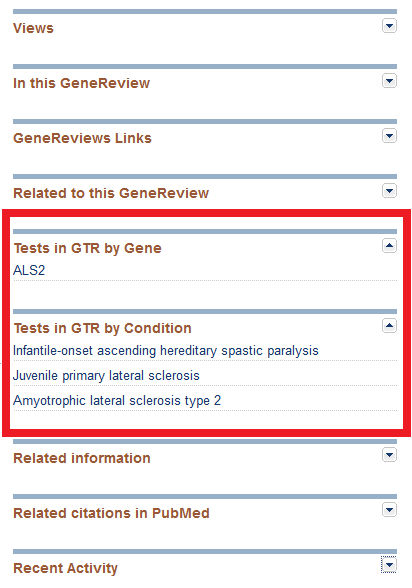
GeneReviews staff have made an editorial decision not to provide active links to GTR within the body of GeneReviews where GeneTests Laboratory Directory links were formerly located (Table 1). However, new links on the right-hand panel labeled ‘Tests in GTR by Gene’ and ‘Tests in GTR by Condition’ lead to test information in GTR, as shown in this image:
Set preferences for your favorite labs using your My NCBI account
If there are one or more laboratories you prefer to use, you can use your My NCBI account to indicate they are your preferred laboratories. This can help you to quickly identify when your preferred laboratories offer tests of interest to you.
- Log into your My NCBI account using NIH login or third-party login. You can also use your My NCBI account to log in, but please note that there are upcoming changes to My NCBI accounts. See the NCBI Account Login Changes FAQs.
- On the GTR website, find the laboratory as described above.
- On the laboratory page, click on Add to preferred labs.
- The My NCBI help document provides more information about the many features enabled by My NCBI and login procedures.
Search the Help documents
Use the All GTR tab on the home page or next to the Search box on other pages. Type your search term and click Search. The left corner of your result list will state how many hits are in GTR help. Click the link or scroll down the page to find those results.
Resources for how to use GTR's web site
Instructions about how to use the Genetic Testing Registry's web site are provided in several formats. We invite you to try the following:
- NCBI Webinar, August 11, 2014, Introducing Three NCBI Resources to Navigate Testing for Disease Linked Variants: MedGen, GTR and ClinVar
- NSGC Webinar January 25, 2012. (download here)
- Fact sheet (see also: NCBI's Education site)
GTR's video library includes:
- Homepage and Basic Search Functions
- Locate a Test in Under Three Minutes
- The All GTR Search Function
- Advanced Search Function
How to find data
Common use cases
| Task | Instructions |
|---|---|
| Query all content simultaneously | On the home page, select the All GTR tab and enter your query. You may either press enter, select a value from the term list provided, or click on Search All GTR. On any result page, enter your query in the search bar, select All GTR from the menu to its right, and execute your search. |
| Find labs that offer a service |
Search for laboratory-specific content by submitting your query under the Labs choice. The following are some of the terms that are supported: Chromosomal Microarray (CMA), Custom Balanced Chromosome Rearrangement Studies, DNA banking, FISH-Interphase Panels, Marker Chromosome Identification, Mutation Confirmation, RNA banking, Uniparental Disomy (UPD) Testing, Whole exome sequencing, Whole genome sequencing Find all labs offering the lab services Whole exome sequencing or Whole genome sequencing here. For specific tests that assay the Human genome, Whole exome, and/or Mitochondrion, see the section Find genomic tests. |
| Search on a word fragment | Start typing your query, and notice the terms underneath the query box that contain what you have entered. The list will be refined with each character you enter. Click on the term below that represents what you want. NOTE: If you click on Search rather than one of the terms that appears below when you have entered a word fragment, you may not get a result. The GTR supports searching word fragments only that match the beginning of a word. |
| Find the Compare Labs function | 1. On the home page, select the Tests tab, start typing your query and select a value from the term list provided, or 2. Navigate to the page with a list of tests (e.g. by searching for a condition and clicking a link for available tests), then select a single condition from the filter menu on the left hand side of the page and click the 'Compare labs' button just beneath the list of conditions. |
Find all registered labs and tests
- Clickhere to find all laboratories in GTR and all registered tests.
- If you click on the Laboratories result, you can then apply filters as well as access the searchable test menu and other details of these labs.
- If you click on the Tests result, you can then apply filters as well as access the details of these registered tests.
- Note that some registered labs may not have any registered tests. Labs may be in the process of submitting information to GTR, or may have services (such as whole genome sequencing) that are not yet in scope as fully registered tests.
Using filters
Filtering of GTR search results is described in the GTR Fact sheet and the YouTube video Locate a Test in Under Three Minutes. When your search result is a list, you can use various filters to narrow the list.
- List of conditions: Refine your search by limiting the results to conditions for which OMIM, GeneReviews, or GTR Tests are available.
- List of tests:
- Select a condition in the upper left to narrow the list. The selection does not transfer to the next page.
- Filter by Test type (clinical or research), Test purpose, Test method, Test services (Carrier testing or Prenatal testing), Lab certification, and Lab location.
- List of labs: Filter by Lab certification, Test services (Carrier testing or Prenatal testing), and Lab location.
How to compare labs
The Compare labs function facilitates the review of laboratories offering tests for a specific condition. This page is analogous to the 'grid' in the GeneTests Laboratory Directory. Each row corresponds to a laboratory and contains information on the test methods used by the specific test(s) the lab offers for the condition selected. Methodologies are displayed horizontally as colored ‘chiclets’ with a letter and a description beneath. Chiclets are vertically aligned allowing the user to scan the page for combinations of methods to plan their testing strategy. Test-specific services for carrier testing and prenatal testing are also represented by chiclets. Laboratories can be sorted alphabetically or selected through checkboxes. Filters for Test method, Test services, Lab certification and Lab location are available to help narrow search results and ease selection of the best laboratory.
Please refer to the Common use cases table above for ways to find the Compare labs function.
Please note the following features of this page:
- If only one laboratory provides one or more tests for the highlighted condition, only one row (lab) will display as there are no other labs for comparison.
- Laboratories that offer research tests which satisfy the search criteria but do not report information about methods will display without methodology chiclets.
- If your initial search was comprised of a condition name AND a gene, the number of tests in the test list page may be different from the number of labs displaying in the Compare labs page. This is because when you click on the disorder name and the Compare Labs button, the page displays a list of labs that provide tests for the highlighted condition regardless of gene.
Information about GTR's data sources
Please refer to the 2013 publication in Nucleic Acids Research, "The NIH genetic testing registry: a new, centralized database of genetic tests to enable access to comprehensive information and improve transparency". Links can be found here.